


T.J.Maxx
4.02.90K Reviews
App Specs
- Version
- 17.1.1
- Updated On
- License
- Free
- Downloads
- 1,000,000+
- Developer
- The TJX Companies, Inc
- Categories
- Shopping
- Platform
- Android, iOS
Screenshots
 Analysis by AppCompare
I judge a shopping app by whether it helps me make a better decision, not just by how many products it puts in front of me. T.J.Maxx is most useful when I want to browse the retailer’s finds, check practical shopping details, or decide whether it is worth making a store visit. It is a free shopping app from The TJX Companies, Inc, and its mix of shopping, rewards, gift cards, and store information makes it more than a simple product catalog.
Browsing that works best at your own pace
In my experience, the app is easiest to use when I have a rough idea of what I want but still enjoy looking around. Its category navigation gives me a route into areas such as clothing, shoes, and bags, while search is more useful when I already have a particular type of item in mind. A rating average of 4.1 across around 6,800 ratings suggests that many shoppers find it useful, though that number alone cannot tell me whether it will suit my habits.
The visual browsing approach fits the way T.J.Maxx shopping often feels: I can look for a specific need, but I may also come across something unexpected. That is enjoyable when I have time to explore; it is less efficient when I need one exact item quickly. I would use the category pages for casual discovery and search when I want to narrow the trip down. The app has reached over one million installs, so it is clearly a familiar option for shoppers who already know the retailer.
Readability and navigation in everyday use
The interface feels straightforward to me, with recognizable shopping sections and a direct path toward store information. That matters if I am checking the app while doing something else, such as planning an errand or comparing a few options at home. The screens are organized around familiar retail tasks rather than requiring me to learn a complicated system, and I can move between browsing and account-related tools without treating them as separate services.
For someone who finds dense menus frustrating, clear category names can make the first visit less daunting. Still, browsing a visual catalog is not the same as finding a particular product immediately. I recommend starting with a clear search phrase when speed matters, then using the available filters where they help. When I am only casually browsing, I would avoid treating every result as a firm shopping plan; the appeal is partly in looking, and that can take longer than expected.
Motor and sensory considerations
Most shopping tasks here involve tapping, scrolling, and reading product information, so the app is a better fit for someone comfortable with those usual phone interactions. I appreciate that the basic route through categories and store details is easy to understand, but an extended browsing session can still ask a lot of a person who has difficulty with repeated gestures or who gets tired from visually scanning many options. Taking one task at a time—checking a store, looking up an item, or reviewing an account detail—can make a session feel more manageable.
I would also be realistic about shopping alerts and promotional material: people who find frequent retail prompts distracting may prefer to open the app only when they have a specific purpose. I would not rely on a phone screen alone for a decision that needs close inspection. If an item’s fit, feel, or finish is important, seeing it in a store may be a more comfortable way to judge it than trying to infer everything from a product page.
Worth Reading Before You Choose

EA SPORTS FC Mobile 26 Is a Bigger Football Game, but It Takes Time

Flipboard Shows What News Apps Must Do Beyond the Feed

Switching to Android Auto Means Rethinking Your Driving Routine

Google Calendar Makes a Crowded Week Easier to Manage

Ludo King Makes the Most of the Minutes Between Plans

Baby Panda World Brings Quick Play to Modern Phones, but Its Game Library Feels Busy
Making the app useful beyond browsing
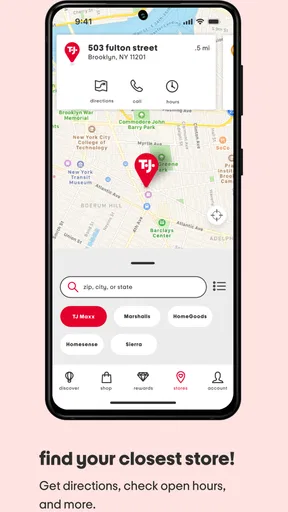
The Store Locator is the feature I would reach for before turning an online search into an in-person trip. It can help me find a nearby location and check details such as directions and hours, which is useful when I am already planning errands. A practical tip is to check those details before leaving rather than assuming a store visit will fit neatly into the day. That small step can save a wasted detour, especially when I am combining shopping with other stops.
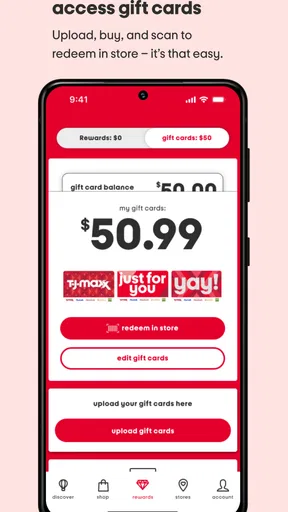
The account area brings together order tracking, a wish list, and gift card balance checking. I find that combination useful for keeping separate shopping tasks in one place: a gift card can be checked before I shop, while an order can be followed without searching through old messages. If I am browsing without a specific purchase in mind, saving an item to a wish list gives me a way to pause rather than making a rushed choice. It also helps me compare options later, although I would still revisit the item details before deciding.
The app is free, and its content rating is Everyone. It is currently version 17.0.0 and requires Android 10 or later. Those details make it straightforward to judge whether it is suitable for a device and household, while the shopping tools themselves are most relevant to people who shop with this retailer. The app has been available since May 22, 2017, and its current role brings store browsing and practical account tasks together.
When a store visit or another shopping route is better
A realistic use case for me is planning a weekend errand: I can check a store’s location and hours, look through the app for something I need, and keep a gift card balance or order detail handy. The app is especially handy when I want to connect online browsing with a nearby visit. It is less compelling if I am comparing the widest possible range of products across many retailers, since a retailer-specific app naturally centers on T.J.Maxx rather than serving as a general marketplace.
Compared with a broad shopping marketplace, this app is a more focused companion to one retailer. That focus can reduce the noise of unrelated sellers, but it also means I would use another option when I want to compare identical products across brands or stores. Compared with simply visiting a T.J.Maxx location, the app offers a convenient way to check account and store details before going, while an in-person visit remains the better choice when I want to inspect an item closely or enjoy browsing racks directly. Neither route replaces the other for every kind of purchase.
I would recommend it most to regular T.J.Maxx shoppers, people who use gift cards, and anyone who likes to check store information before heading out. A less frequent shopper can still benefit from the locator or account tools, but may not need to keep a dedicated retailer app in regular rotation. If I need a highly controlled, exact-product shopping experience, or if I dislike open-ended browsing, I would start with a focused search elsewhere and use this app only for retailer-specific tasks.
Inclusive use and remaining barriers
For different abilities and situations, the app’s clearest strength is that its main purposes are easy to describe: browse, manage shopping details, and locate a store. That makes it easier to plan a short session around one goal rather than navigate an unfamiliar service. Someone using a phone in a noisy setting can check store details quietly, while someone with limited time can go straight to the task they need instead of treating the app as a place to wander.
There are still practical barriers. Product discovery depends on screen-based browsing, and the pace of scanning can be tiring or inconvenient in bright light, while commuting, or when a person has limited dexterity. A store visit may solve questions about texture or fit, but it is not equally convenient for everyone. I would treat the app as one part of a shopping routine, not as a guarantee that every task will be equally easy for every user. The best workaround is to choose the channel that suits the task: use the app for planning and account checks, and seek in-person help or inspection when screen browsing leaves an important question unanswered.
There are also a few decisions worth making before relying on it. If I am just checking whether I have a gift card balance, I can keep the visit short and avoid getting pulled into browsing. If I am using the wish list to postpone a purchase, I would treat it as a reminder rather than an assurance that an item will remain available. And if I am making a special trip, I would verify the store details close to the time I leave. These habits make the app more useful without assuming that every online discovery will translate into the exact same store experience.
My take for the right kind of shopper
Overall, T.J.Maxx suits people who value a bridge between online browsing and an in-store shopping routine. I like that it combines retail discovery with practical tools such as order tracking, gift card checks, and store location details. Its strongest use is not replacing every other way to shop; it is making the retailer’s own shopping tasks easier to organize. If I already shop there, I can see a reason to keep it available. If I rarely visit, the store-related features may matter more than browsing.
My recommendation is to try it if you want a convenient way to plan a T.J.Maxx visit or keep shopping details together, and to skip it if you want a neutral, all-retailer comparison tool. The app is free, so trying it does not require a purchase, but whether it earns a regular place on your phone depends on how often you use the retailer. I would use it with a clear purpose, keep expectations realistic about screen-based discovery, and choose an in-person visit whenever seeing an item for myself matters more than browsing from a phone.
What the app feels like to use
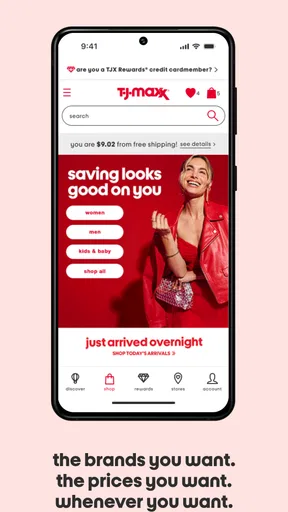
From the moment I opened the app, I was met with a sleek and intuitive design. The T.J.Maxx app is all about simplicity and ease of use, something I truly appreciated. The home page greets you with a carousel of featured products and deals, making it easy to jump right into shopping.
Navigation is a breeze, with straightforward categories like Women's, Men's, Kids', Shoes, Handbags, and more. There’s even a "New Arrivals" section for those who are always on the lookout for the latest trends. The app's search function is robust, allowing you to filter by size, color, brand, and price. It’s like having your personal shopping assistant right in your pocket!
Features That Stand Out
One feature that caught my eye is the "Store Locator." If you’re like me and occasionally enjoy the thrill of a good in-person shopping spree, this feature is your best friend. It provides details about the nearest store, including directions and store hours, so you can plan your visit accordingly.
Another highlight is the "My Account" section where you can track your orders, manage your wish list, and even check your gift card balance. This level of organization makes it super easy to keep tabs on your shopping activities.
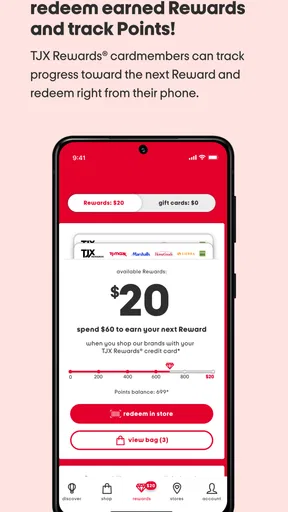
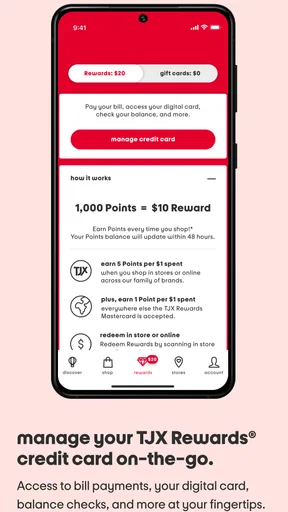
The app also offers a "Rewards" program. You earn points for every dollar spent, which can then be redeemed for discounts. It’s an excellent way to save a bit more on your purchases, which is always a plus in my book.
Shopping Experience
Shopping on the app is as seamless as it gets. Adding items to your cart is a one-tap affair, and the checkout process is straightforward. You can even check out as a guest if you’re in a hurry, though I recommend creating an account for the full experience. The app supports a variety of payment methods, including major credit cards and PayPal, providing flexibility for different users.
What I really enjoyed was the constant stream of deals and discounts. It keeps the shopping experience fresh and exciting. You never know what gem you might find next at a fraction of the cost. Plus, the app frequently updates its inventory, ensuring there’s always something new to discover.
Final Thoughts
In conclusion, the app is a must-have for anyone who loves shopping but values convenience and savings. It combines the thrill of treasure hunting with the ease of online shopping, making it a unique addition to my phone. The app’s user-friendly design, combined with its robust features, makes shopping an enjoyable experience.
If you haven’t already, I highly suggest giving it a try. Whether you’re looking for fashion, home décor, or gifts, this app has it all. Happy shopping!
Pros
- User-friendly interface for easy navigation.
- Frequent updates with new products.
- Secure payment options available.
- Personalized shopping recommendations.
- Loyalty program offers exclusive discounts.
Cons
- Limited product availability in some regions.
- Occasional app crashes reported by users.
- Longer delivery times during sales.
- Customer service response can be slow.
- No option to track orders in real-time.
FAQs for T.J.Maxx
What features does the T.J.Maxx app offer?
The T.J.Maxx app provides a seamless shopping experience with features like easy browsing of the latest fashion trends, home goods, and more. Users can access exclusive in-app promotions, create a wishlist, and manage their T.J.Maxx Rewards account. The app also offers a store locator to find nearby T.J.Maxx locations.
How user-friendly is the T.J.Maxx app?
The T.J.Maxx app is designed with a user-friendly interface that makes navigation intuitive. Whether you are browsing categories or searching for specific items, the app provides a smooth and engaging experience, allowing users to shop effortlessly. The checkout process is streamlined, ensuring a quick and easy purchase experience.
Does the T.J.Maxx app offer any rewards or loyalty programs?
Yes, the T.J.Maxx app integrates with the T.J.Maxx Rewards program, allowing users to earn points on their purchases. These points can be redeemed for rewards and exclusive offers. Users can easily track their points and rewards directly through the app, making it convenient to stay updated on their loyalty benefits.
Are there any security concerns with the T.J.Maxx app?
The T.J.Maxx app prioritizes user security by employing advanced encryption techniques to protect personal and payment information. Regular updates ensure the app remains secure against potential threats. Users are encouraged to use strong passwords and keep the app updated to maintain optimal security.
Can I use the T.J.Maxx app internationally?
The T.J.Maxx app primarily serves customers in the United States, and its features are optimized for the domestic market. While some functionalities may work internationally, users outside the U.S. might experience limited access to certain features or promotions. It is advisable to check compatibility with local app stores.


